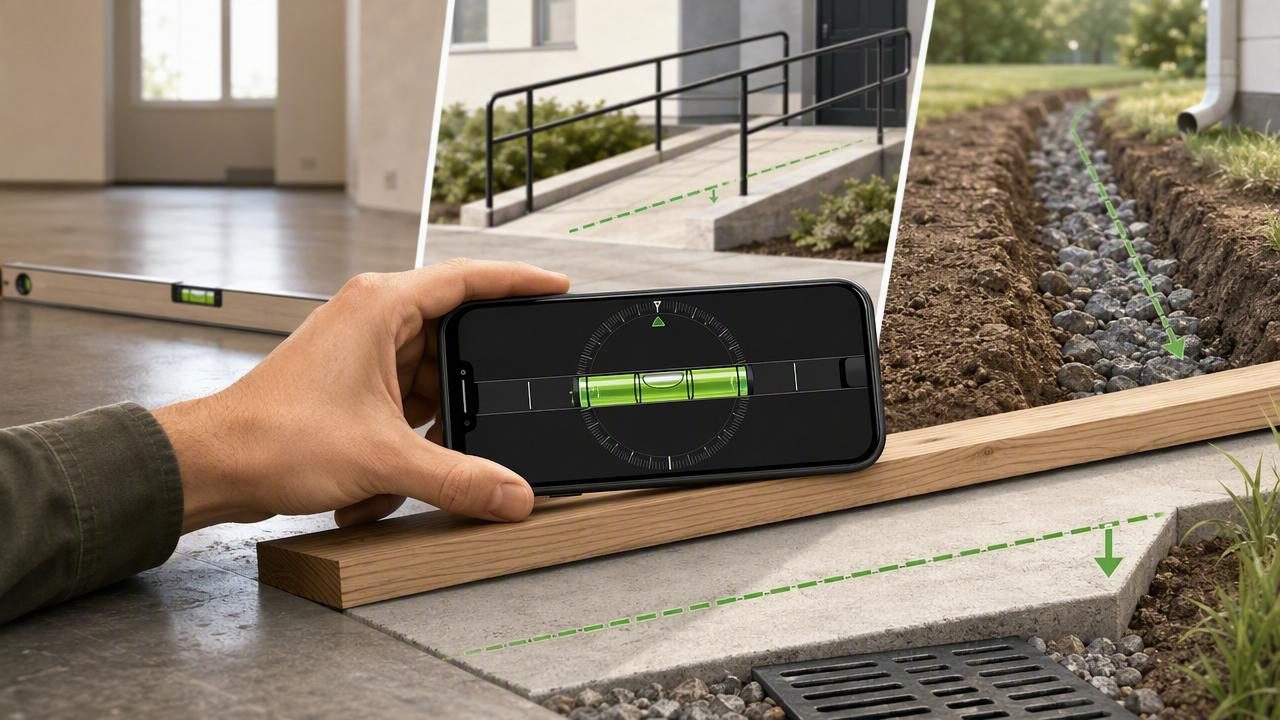
Whether you are checking a patio for drainage, setting a wheelchair ramp, laying tile, or planning a garden path, slope matters. A surface that looks nearly flat can still have enough pitch to send water toward a foundation, create an uncomfortable walking surface, or cause an installation to look uneven. An offline level app for precise slope readings gives DIYers and professionals a convenient way to check angles and grade when Wi-Fi or cellular service is unavailable.
Modern iPhones contain motion sensors that can detect changes in orientation with impressive responsiveness. When used carefully, a digital level or inclinometer can turn your phone into a useful pocket measurement tool. The key is understanding what the display means, calibrating when necessary, and using a consistent method for the job at hand.
What Is a Slope Reading?
A slope reading describes how much a surface rises or falls over a horizontal distance. Digital level apps commonly present this information as degrees, percent grade, or a rise-over-run ratio. Each format is useful, but choosing the right one makes planning and communication easier.
| Measurement Format | What It Means | Best Uses |
|---|---|---|
| Degrees (°) | The angle from true level | Cutting, framing, roof angles, general alignment |
| Percent grade (%) | Vertical change per 100 horizontal units | Drainage, landscaping, paths, ramps |
| Rise over run | Vertical rise for a given horizontal distance | Construction layout and communicating a planned grade |
For example, a 2% slope means a surface drops 2 units vertically for every 100 units horizontally. Over a 10-foot run, that equals a drop of about 2.4 inches. A reading of 0° or 0% indicates level, while a positive or negative value indicates the direction and amount of tilt.
Why Offline Functionality Matters for Measurement Work
Measurement does not always happen at a desk, in a workshop, or within reliable network coverage. You may need to inspect a shed pad at a rural property, check a trail-side drainage channel, or take readings in a basement with poor reception. An offline app continues to work because it relies on the phone’s built-in sensors rather than a remote connection.
Offline functionality also has practical advantages beyond connectivity:
- Immediate access: Open the tool and take a reading without waiting for pages, accounts, or cloud features to load.
- Consistency: Core measurement functions remain available in garages, job sites, outdoors, and remote locations.
- Privacy: Basic sensor readings can be processed on the device rather than needing to be transmitted.
- Reliability: A weak signal cannot interrupt a simple leveling or slope-checking task.
This does not mean a phone replaces every professional instrument. For high-stakes engineering, code compliance, long-distance grading, or formal surveys, use the specified calibrated equipment and follow local requirements. For everyday checks, layout, and preliminary assessment, an offline iOS measurement app can be extremely practical.
How an iPhone Measures Incline
Your iPhone uses sensors such as an accelerometer and gyroscope to detect its orientation in space. A level app translates that sensor information into a readable angle or grade. When the phone is resting against or on a surface, its orientation becomes a proxy for the surface’s orientation.
That principle is simple, but the quality of the result depends on contact. A phone case with a raised camera bump, a curved back, or a soft protective edge may keep the device from lying flat. Uneven materials such as rough concrete, gravel, textured tile, or warped lumber can also distort a single reading.
Good measurement starts with good contact. Place the device on a flat, clean reference surface whenever possible, and repeat the check from more than one position.
Prepare Your Phone Before Taking a Reading
Taking a few seconds to prepare reduces avoidable errors. Use this quick checklist before measuring a slope:
- Remove or account for a bulky case, especially one with uneven edges or a large camera lip.
- Clean dust, sand, or debris from the surface and the phone’s contact points.
- Open the level or inclinometer tool while holding the phone still.
- Calibrate or zero the tool on a known level reference if the app supports it.
- Decide whether you need degrees, percent grade, or rise over run before recording values.
- Take at least two readings, ideally after rotating the phone 180 degrees.
The rotation check is especially useful. If readings change significantly after you rotate the phone on the same surface, inspect the contact points, recalibrate, and try again. Small variations can happen, but repeated readings should be reasonably close for a stable surface.
Step-by-Step: Check a Surface for Slope
1. Identify the direction water or movement should go
Before measuring, define the intended direction of fall. On a patio, water may need to move away from the home. On a ramp, the travel direction determines whether the reading represents ascent or descent. On a shelf, you may simply want a zero-degree result.
2. Use a straight reference for irregular surfaces
For uneven paving, gravel, soil, or a long floor, do not rest the phone directly on every bump. Place it on a straight board, screed, metal rule, or other rigid reference piece. The reference averages small surface imperfections and provides a more meaningful indication of the overall grade.
3. Place the phone along the line of slope
Align the long edge of the device with the direction you want to measure. If you place it sideways across the fall, you may measure cross-slope instead. Both measurements can be useful, but they answer different questions. For drainage, the main fall direction is usually the priority; for ramps and walkways, check cross-slope too.
4. Wait for the value to settle
Hold the device still or let it rest on the reference surface. Sensor values may shift slightly as your hands move or the phone settles. Record the stable reading rather than the first number that appears.
5. Repeat at multiple points
A slope can vary across a large area. Check the top, middle, and bottom of a path, floor, or drainage run. If values differ widely, the surface may have low spots, humps, or unintended changes in grade.
Using Percent Grade for Drainage and Landscaping
Percent grade is one of the easiest formats for outdoor projects because it directly relates vertical change to horizontal distance. The calculation is:
Percent grade = (vertical rise or fall ÷ horizontal run) × 100Suppose a patio needs to fall away from a wall over 8 feet. If your reference board shows a 1% grade, the total drop over that distance is about 0.96 inches. At 2%, the drop is about 1.92 inches. This helps you visualize whether the measured pitch matches your plan.
However, target slope depends on the material, local conditions, project design, and relevant building rules. Do not assume one percentage fits every driveway, roof, accessible route, shower floor, or drainage installation. Confirm the requirements for your project before making permanent changes.
Common DIY Uses for Precise Slope Readings
- Patios and pavers: Verify that the finished surface encourages water to move in the intended direction.
- Garden beds and drainage channels: Check whether runoff has a continuous path instead of pooling.
- Floor preparation: Identify low or high areas before flooring, tile, or self-leveling compound work.
- Ramps and walkways: Measure longitudinal slope and cross-slope during planning and inspection.
- Roof and shed projects: Check pitch for layout, material planning, and visual consistency.
- RV, camping, and outdoor setups: Level a vehicle, table, cooler stand, or portable equipment without relying on service.
Ways to Improve Accuracy
An app reading is only one part of a careful workflow. Use these habits to improve confidence in the result:
- Measure a longer run: A slight angle is easier to interpret over a long, straight reference than over a short section.
- Check both axes: Dual-axis leveling helps reveal whether a surface is tilted front-to-back, side-to-side, or both.
- Use repeat measurements: Record several readings and look for a consistent range rather than trusting one result.
- Compare with another tool: For important work, verify with a spirit level, straightedge, tape measure, laser level, or professional-grade instrument.
- Watch for magnetic interference: Metal surfaces and nearby tools can affect compass functions, though they do not usually determine basic gravity-based leveling.
Understand the Limits of a Phone Level
A phone-based inclinometer is ideal for quick checks, planning, and routine DIY verification, but it has limits. Temperature, vibration, case design, an uneven contact surface, and user handling can influence readings. It also cannot replace equipment required for certified surveys, structural work, accessibility compliance, or legal boundary and elevation determinations.
Think of the app as a highly accessible measurement companion: excellent for spotting problems early, confirming a setup, and making informed adjustments. When tolerances are very tight or the consequences of error are significant, confirm results with appropriate professional tools.
Choose an Offline Tool That Fits Your Workflow
Look for an iOS tool that clearly displays angle and slope units, supports calibration, works without a subscription barrier, and remains usable without an internet connection. A readable interface, stable dual-axis display, and the ability to switch between level and inclinometer views are particularly helpful when moving between indoor home improvement and outdoor navigation tasks.
For users who want several device-sensor utilities in one offline package, Level Tool includes leveling and navigation-oriented measurement features designed for practical work away from a connection.
Final Takeaway
An offline level app for precise slope readings can make everyday measuring faster and more flexible. Prepare the phone properly, use a straight reference on uneven surfaces, measure in the correct direction, and repeat your readings. With those habits, you can confidently assess slopes for drainage, flooring, outdoor projects, ramps, and countless other DIY tasks—even when there is no signal available.
Put the workflow into practice
The measure angle iphone guide explains reference calibration and repeatable placement. Check the contact surface carefully; offline operation does not remove errors caused by a rocking case or camera bump.
See Bubble Level & Angle Finder on the App Store for current availability and details.
