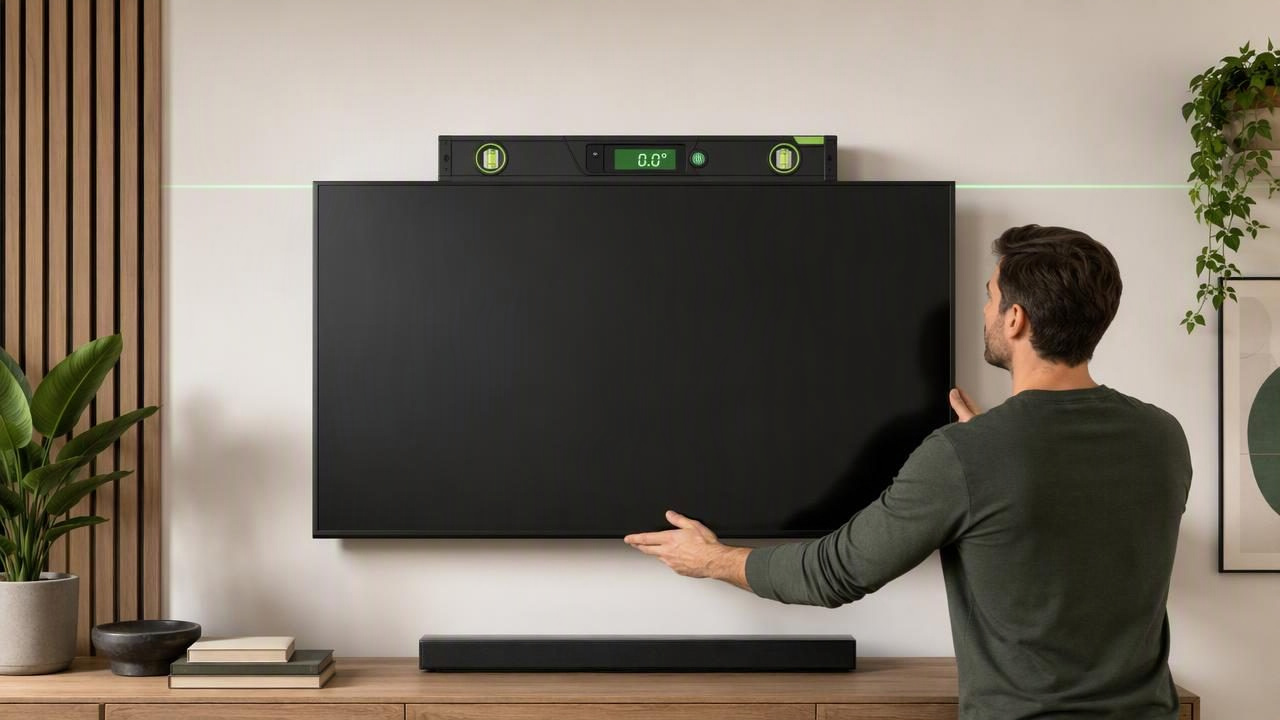
Finding the best digital spirit level to align wall-mounted televisions is less about buying the most complicated tool and more about getting reliable, repeatable measurements at the right stages of installation. A television that is only slightly out of level can look noticeably crooked against a ceiling line, cabinet, fireplace surround, or media wall. Even a small tilt becomes easier to spot when the screen is large.
A digital spirit level can help you position the wall plate, confirm the TV bracket is horizontal, and check the final screen after it is mounted. However, the best choice depends on the job. A dedicated physical digital level is often best for long mounting rails and professional installations, while a calibrated iPhone level app can be a practical backup or compact option for DIY work.
This guide explains what to look for, how to measure correctly, and where digital leveling tools have limits when mounting a television.
What Makes a Digital Spirit Level Good for TV Mounting?
Wall-mounted televisions create a specific leveling challenge: the mounting plate may be level while the television itself appears off because of an adjustable bracket, uneven mounting points, or a screen that is not sitting squarely on the mount. The ideal tool should make it easy to check both the wall plate and the finished screen.
Look for these useful characteristics:
- A clear horizontal readout: A digital display showing degrees, a percentage slope, or a level indicator is easier to interpret than estimating a bubble position alone.
- A sufficiently long reference edge: Longer levels can span more of a mounting rail, reducing the influence of small surface irregularities.
- Calibration capability: Digital sensors should be calibrated according to the tool manufacturer's instructions before precise work.
- Stable contact: The level must sit flat against the bracket, wall plate, or another suitable reference surface.
- Repeatable readings: You should receive the same result when measuring the same surface more than once.
- Easy-to-see feedback: A target display, audible signal, or haptic feedback can help when your attention is on holding the bracket in place.
For a typical TV installation, a physical digital level around the length of the wall plate is especially useful. If the plate is 18 inches wide, for example, a very short tool may measure a limited section rather than the full span. That does not make a short level unusable, but it makes careful repositioning and repeated checks more important.
Digital Spirit Level vs. Phone Level App
Both tool types can be useful, but they work differently. A traditional digital spirit level uses sensors inside a rigid tool body with a straight reference edge. An iPhone level app uses the device's motion sensors and requires the phone itself to make stable, direct contact with the surface being checked.
| Tool Type | Best Use During TV Mounting | Important Limitation |
|---|---|---|
| Physical digital spirit level | Checking long wall plates and bracket rails | Requires storage space and may not fit tight areas |
| Small torpedo level | Quick checks on compact brackets | May not represent the full width of a long rail |
| iPhone level app | Checking angle, confirming a small bracket, and making quick adjustments | Needs calibration and solid surface contact |
| Bubble level | Simple visual confirmation | Does not always provide a numeric angle reading |
A phone is not a replacement for every professional leveling task. It is particularly helpful when you need a compact angle meter, want to check a mounting plate before tightening fasteners, or need an offline tool while working in a room without reliable service. It should not be used to measure through a photo or from across the room; accurate leveling requires actual contact with the bracket or another flat reference surface.
How to Choose the Right Tool for Your Installation
Choose a physical digital level for long rails and frequent installations
If you install televisions regularly, work with wide brackets, or need to level cabinetry and shelves as part of a larger home improvement project, a dedicated digital spirit level is usually the most convenient primary tool. Its long, rigid edge can rest across the mounting plate, making it easier to assess whether the rail is level from end to end.
Select a length that matches common bracket sizes without becoming awkward to use. A longer tool can provide a better overall reference, but it still needs to contact the rail cleanly rather than resting on screw heads, wall anchors, or uneven hardware.
Choose an iPhone level app for compact DIY checks
An iPhone level tool is useful when you need a portable option for occasional DIY work. The most important features are a clear bubble-level display, a numeric angle meter, calibration controls, tolerance settings, and feedback that helps you know when you have reached the target.
Calibration matters because phone sensors can be affected by how the device is positioned. Before relying on the reading, calibrate the app on a known level reference when possible. Then place the phone on the same flat part of the bracket each time you check it.
Choose a tool with a tolerance setting when “close enough” is defined
For TV mounting, the goal is normally level at 0°. A tolerance setting can still be useful because it tells you when the reading is within your chosen margin rather than forcing you to chase tiny changes caused by hand pressure or surface texture. Use the smallest practical tolerance for the project, but do not confuse a tolerance display with certified accuracy.
A Practical Example: Leveling a 65-Inch Television Bracket
Imagine mounting a 65-inch television on a wall using a 24-inch horizontal wall plate. You have marked the desired height and drilled the first mounting holes. Before fully tightening the remaining screws, place a physical digital level across the top edge of the wall plate.
- Hold the plate against the wall with the first screws lightly tightened.
- Place the level on a clean, flat section of the plate, avoiding raised screw heads.
- Adjust the free side of the plate until the display indicates level.
- Mark or drill the remaining holes while keeping the plate in position.
- Tighten the fasteners gradually, alternating sides so the plate does not shift.
- Measure the plate again after tightening.
- Mount the TV, then check a flat horizontal edge of the television or bracket frame if accessible.
If you are using an iPhone instead, first calibrate it on a trusted reference surface. Place it directly against the same flat portion of the mounting plate for each reading. Check the plate near the left side, center, and right side. If readings differ significantly, stop and investigate: the plate may not be flat, the phone may be resting on hardware, or the wall surface may be affecting how the bracket sits.
For example, if the left side reads 0.0° and the right side reads 0.4°, do not assume the bracket is level. Reposition the device, confirm contact, and repeat the measurement. Consistent readings are more useful than a single reading taken quickly.
How to Get Repeatable Level Readings
Repeatability is one of the most useful checks in DIY measurement. A reading is more trustworthy when you can reproduce it under the same conditions.
- Clean dust, tape residue, and debris from the contact surface.
- Keep the tool or phone flat rather than balancing it on a rounded edge.
- Use the same reference point for repeated measurements.
- Wait briefly for the display to settle before recording an angle.
- Check before and after tightening screws, since tightening can pull a bracket slightly out of position.
- Turn the level around and measure again when practical. A major difference can indicate poor contact, calibration issues, or an uneven surface.
It is also wise to separate “the bracket is level” from “the television looks level.” Many TV mounts allow tilt, swivel, or small lateral adjustments. After the screen is attached, inspect the visible screen edge relative to nearby visual references, then make bracket adjustments according to the mount instructions.
Common Mistakes When Leveling a TV Mount
Using the ceiling as the only reference
Ceilings, floors, trim, and fireplaces are not always level. A TV can be mechanically level yet appear visually different beside an uneven architectural feature. Start with a true level bracket, then assess the finished appearance. Do not deliberately set a mount out of level without understanding the visual trade-off.
Measuring on the TV screen
A screen is not always the best measurement surface. Curved displays, bezels, protective films, and uneven contact can affect the result. Use the bracket or a known flat structural edge when possible.
Ignoring wall and hardware conditions
A level cannot correct an insecure installation. Confirm the mount is rated and installed appropriately for the television, wall type, fasteners, and stud or masonry conditions. Follow the mounting manufacturer's instructions, especially for load requirements and spacing.
Expecting a phone to replace all installation tools
An iPhone level can help with angle checks, but it does not identify studs, verify hidden wiring, measure wall strength, or automatically lift and position a television. Use the appropriate tools and get assistance when lifting a large screen.
When an Offline Level App Is Useful
Offline functionality is valuable in garages, basements, newly renovated rooms, outdoor installations, and locations with weak reception. Core leveling does not need an internet connection because the reading comes from device sensors, not an online service. That means you can calibrate, check an angle, and confirm a bracket position without depending on Wi-Fi or mobile data.
For an iPhone-based option with bubble level, angle measurement, calibration, targets, tolerance, sound, and haptic feedback, Level Tool's guide to measuring angles on iPhone explains how to use a phone as a stable contact-based measuring tool during DIY projects.
Final Recommendation
The best digital spirit level for aligning a wall-mounted television is the one that matches the bracket size and lets you verify the result repeatedly. For wide rails and regular installation work, a dedicated physical digital level is usually the strongest choice. For occasional home improvement tasks, a calibrated iPhone level app is a convenient companion for checking angles and confirming adjustments.
Whichever tool you use, prioritize direct contact, calibration, a flat reference surface, and repeat measurements before tightening every fastener. Those habits do more for a straight-looking television than relying on one quick reading alone.
